Save Editor / Games / Unreal Engine games (.sav)
Unreal Engine Save Editor (UE4 / UE5 .sav)
Open any Unreal Engine 4 or 5 .sav (GVAS) in your browser: edit money, levels, booleans and text, keep everything else byte-for-byte.
Modding instead of editing? How to install mods with r2modman or Gale
Project sources: trumank/uesave-rs (command-line GVAS reader/writer)
⚠ Only edit saves of games you play offline or single-player. Editing saves of online games with anti-cheat or a shared economy can get your account banned.
How to verify it never uploads: open DevTools → Network, load your save and download the edited copy — no request carries your file (the only outgoing call is an anonymous page-view count). You can also load the page, turn off Wi-Fi and edit offline.
What you can edit in Unreal Engine games (.sav)
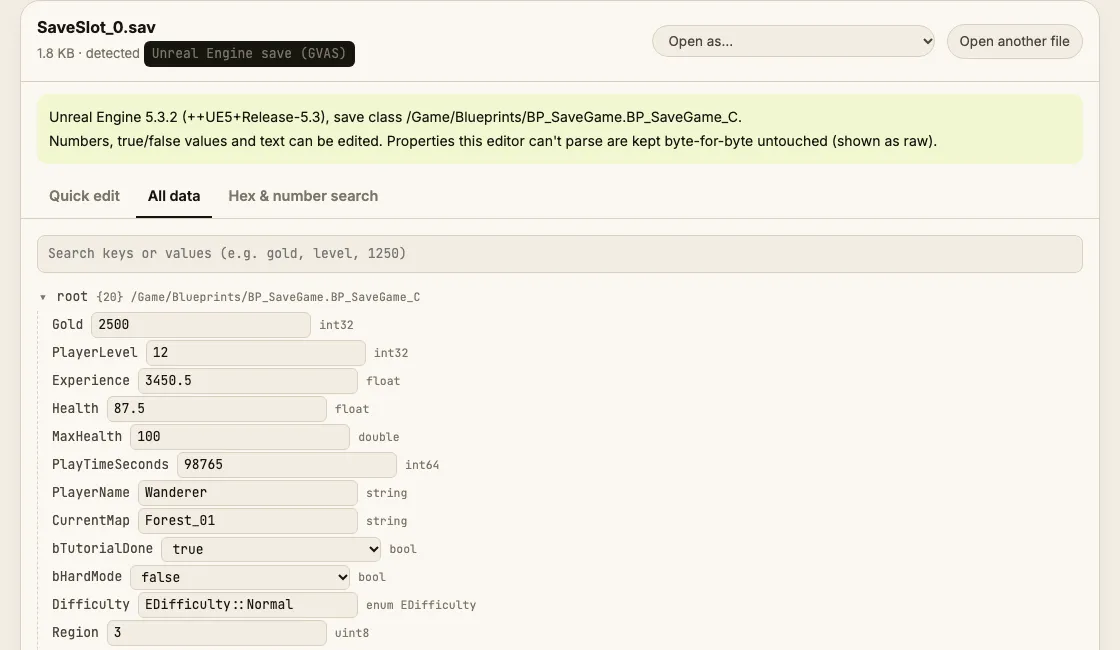
- Int, Int64, Float, Double, Byte and Bool properties (money, XP, level, unlock flags)
- Str, Name and Enum text values; strings can change length
- Values inside structs, arrays and maps, shown as a tree in All data
- Header shown for reference: save-game version, engine version, save class
Where is the Unreal Engine games (.sav) save file?
| Platform | Location |
|---|---|
| Windows (most games) | %LOCALAPPDATA%\<ProjectName>\Saved\SaveGames\<ProjectName> is the game's internal name, which is often not the store name. Search %LOCALAPPDATA% for a SaveGames folder. |
| Windows (some Steam games) | %LOCALAPPDATA%\<ProjectName>\Saved\SaveGames\<SteamID64>\A folder named after your Steam ID means the save belongs to that account. |
| Steam Deck / Linux (Proton) | ~/.local/share/Steam/steamapps/compatdata/<AppID>/pfx/drive_c/users/steamuser/AppData/Local/<ProjectName>/Saved/SaveGames/ |
| Game Pass / Microsoft Store | %LOCALAPPDATA%\Packages\<publisher.game>\SystemAppData\wgs\These are containers with random file names. The data inside is usually still GVAS, but the container index must stay in step, so copy the whole folder first. |
Tip: on Windows, paste a path that starts with % into the File Explorer address bar.
How to edit your Unreal Engine games (.sav) save
- Quit the game completely. Pause Steam Cloud for this game if it uses cloud saves.
- Copy the whole SaveGames folder somewhere safe.
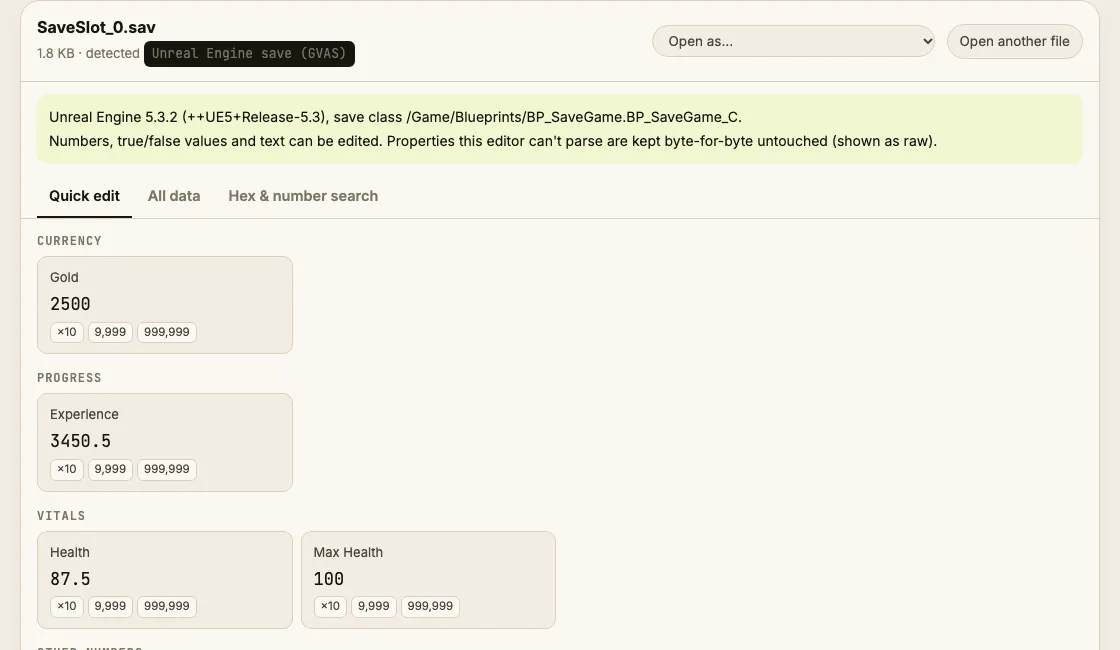
- Drop the .sav below. If the header shows GVAS and a save class, the file is readable.
- Change values in Quick edit, or find a property by name in All data.
- Download the edited save and replace the original with the same file name. Start the game offline and check.
Tips
- Not sure which slot is yours? Save in-game, then sort the folder by Date modified. The newest .sav is the one you just wrote.
- Change one value at a time. If the game rejects the file, you'll know which edit caused it.
Limits
- Only uncompressed GVAS. A file that doesn't start with the bytes GVAS is compressed, encrypted or wrapped. Palworld's older zlib saves have their own page; Oodle and encrypted saves aren't supported.
- Custom binary data some games serialise themselves (inventories stored as byte arrays, world chunks) stays opaque. It's kept intact but you can't edit it.
- A few games also keep a checksum or a second copy of the value elsewhere. If an edit is ignored, the game is probably recalculating it.
- Single-player and offline use only. Unreal Engine is a trademark of Epic Games; this independent tool isn't affiliated with Epic or any game studio.
Editors that work the same way
- Deep Rock Galactic Save Editor: a UE4 game whose credits and minerals are read by this same GVAS reader, with names for the resource GUIDs.
- Palworld Save Editor: a UE5 game whose zlib-wrapped Level.sav is unpacked first and then read by this same GVAS reader.
- Renpy Save Editor (Ren'Py .save & persistent): the equivalent engine-level editor for Ren'Py visual novels, where every store variable is editable.
- RPG Maker Save Editor (MV & MZ): another engine-wide editor, for RPG Maker MV and MZ games' gold, items and variables.
Unreal Engine games (.sav) save editing FAQ
How do I know if my game's save is GVAS?
Open the .sav in any hex editor or drop it below. A GVAS save starts with the four letters GVAS. If you see something else, such as PlZ, a zlib header or random bytes, the file is compressed or encrypted.
Does it work with UE5 games?
Yes. The reader handles save-game versions 2 and 3, including the extra UE5 package version, and the newer 5.4+ property tag layout. The custom-version table is kept as it was.
Is this the same as uesave or a desktop GVAS editor?
It's the same idea, a property-level GVAS reader, but it runs in the browser. Nothing is installed and the file never leaves your computer. For scripted batch edits or JSON round-trips, the open-source uesave command-line tool is still the better choice.
Why didn't my change stick in the game?
Three common causes: Steam Cloud put the old file back, the game keeps the value in a second save slot or profile file, or the value is recalculated on load. Check the other .sav files in the same folder.
Can I add new properties or items?
Not yet. The editor changes values that already exist. Adding properties means rewriting the file structure, and an edit like that is easy to get wrong without the game's own class definitions.
Can I get banned?
Don't take edited saves into online or anti-cheat sessions. In offline single-player, the save is yours to change, but there's no guarantee a game won't flag it.
Round-trip tests on GVAS files built to the published format (UE4 and UE5 headers): unchanged export is byte-identical, edits reopen. Real-game coverage comes from the Palworld and Deep Rock Galactic pages that use the same reader. Save Editor is an independent tool and isn't affiliated with the makers of Unreal Engine games (.sav).
Other save editors