Save Editor / Games / Deltarune
Deltarune Save Editor
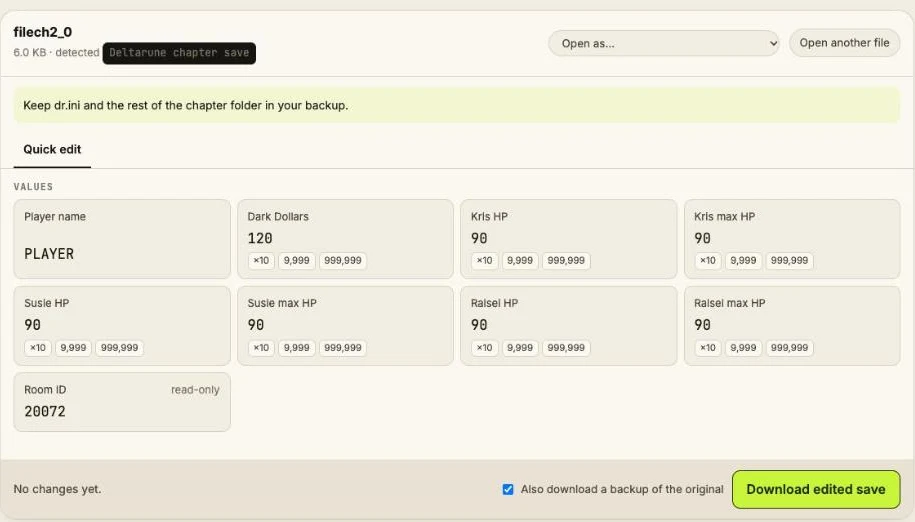
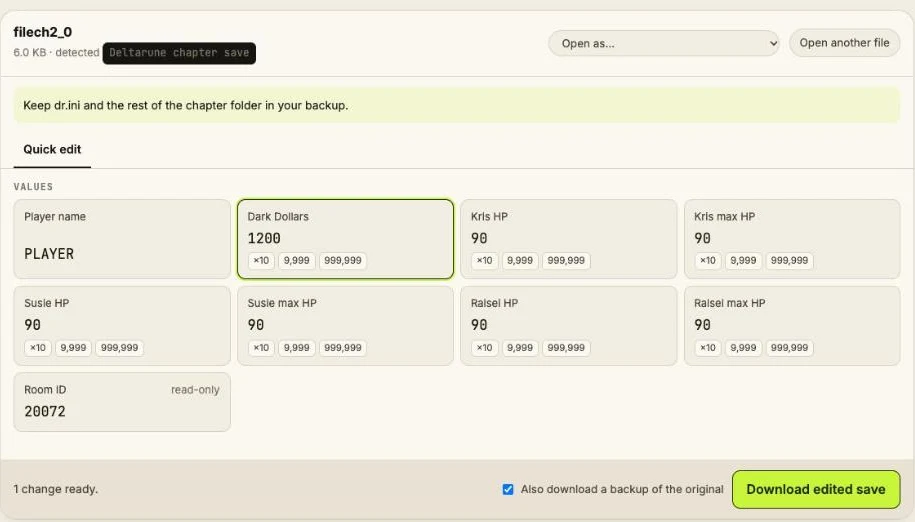
Open a Chapter 1–4 filechN_N save to edit your player name, Dark Dollars and party HP.

Modding instead of editing? How to install mods with r2modman or Gale
Project sources: Tenna EditorDeltarune Wiki save locations
⚠ Only edit saves of games you play offline or single-player. Editing saves of online games with anti-cheat or a shared economy can get your account banned.
How to verify it never uploads: open DevTools → Network, load your save and download the edited copy — no request carries your file (the only outgoing call is an anonymous page-view count). You can also load the page, turn off Wi-Fi and edit offline.
What you can edit in Deltarune
- Player name
- Dark Dollars
- Kris, Susie and Ralsei HP and max HP
- Room ID (read-only)
Where is the Deltarune save file?
| Platform | Location |
|---|---|
| Windows | %LOCALAPPDATA%\DELTARUNE\Open the matching chapter and slot file. |
| macOS | ~/Library/Application Support/com.tobyfox.deltarune/Back up the directory including dr.ini. |
| Steam Deck (Proton) | ~/.local/share/Steam/steamapps/compatdata/1671210/pfx/drive_c/users/steamuser/AppData/Local/DELTARUNE/Use the prefix in the Steam library where the game is installed. |
Tip: on Windows, paste a path that starts with % into the File Explorer address bar.
How to edit your Deltarune save
- Quit the game and pause cloud sync.
- Copy the entire save folder to a backup outside the game directory.
- Open the indicated file and confirm the values match your progress.
- Make one change and download the edited file. Replace the original using the same filename.
- Launch offline and check the result. Restore the complete backup with the game closed if needed.
Limits
- The editor covers the mapped Chapter 1–4 text layout. Keep dr.ini in the backup.
- Story flags and equipment are preserved. The room ID is read-only.
Deltarune save editing FAQ
Which file holds the first slot?
The _0 suffix is the first manual slot for the chapter in the filename.
What are filech1_3 and dr.ini?
filech1_3 is the first Chapter 1 completion save. dr.ini holds game-managed slot metadata.
Will changing HP move me to another room?
The save retains its current room and story flags.
How do I restore a backup?
Close the game and copy the backed-up save folder to its original location.
Why did my changes disappear?
Cloud sync can restore an older copy. Pause sync and verify the edited save offline before resuming.
Opened and round-tripped public Chapter 1–4 slot files. In-game loading has yet to be tested. Save Editor is an independent tool and isn't affiliated with the makers of Deltarune.
Other save editors