Save Editor / Games / Slay the Spire 2
Slay the Spire 2 Save Editor & Cheats
Edit Slay the Spire 2 saves in your browser: gold, HP, max energy, potion slots and unlocked ascension.

Modding instead of editing? How to install mods with r2modman or Gale
Project sources: Edit-The-Spire (open-source desktop editor)
⚠ Only edit saves of games you play offline or single-player. Editing saves of online games with anti-cheat or a shared economy can get your account banned.
How to verify it never uploads: open DevTools → Network, load your save and download the edited copy — no request carries your file (the only outgoing call is an anonymous page-view count). You can also load the page, turn off Wi-Fi and edit offline.
What you can edit in Slay the Spire 2
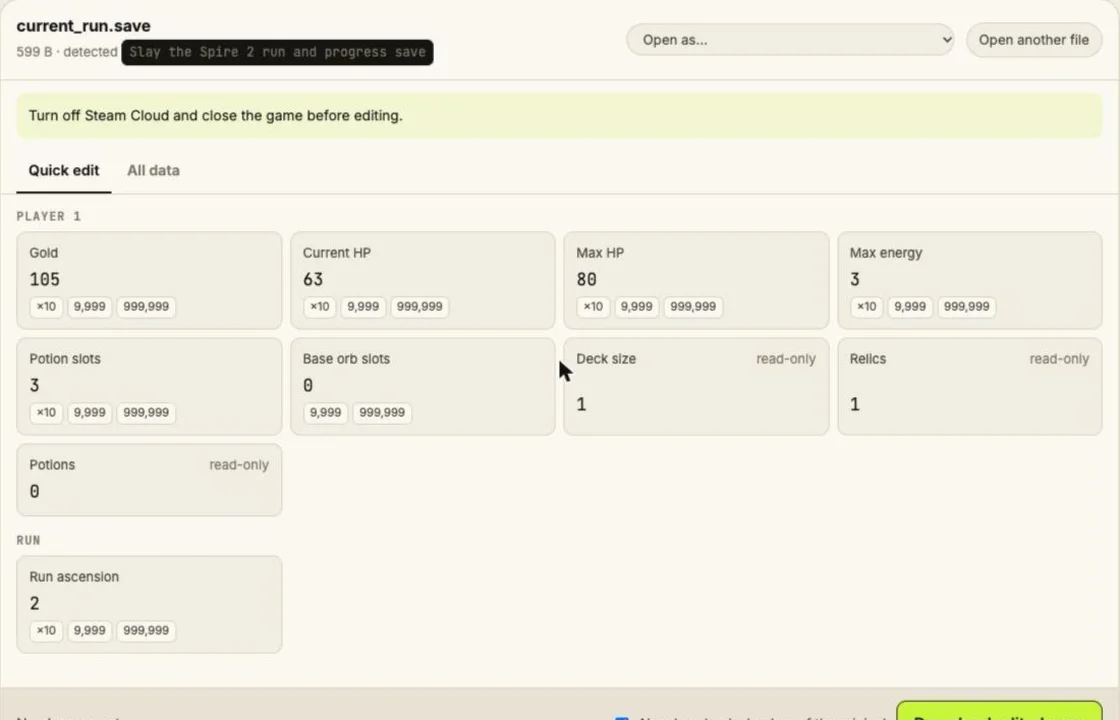
- Gold, current HP and max HP for every player in the run (co-op runs list each player)
- Max energy, potion slots and base orb slots
- Run ascension, plus unlocked and preferred ascension per character in progress.save
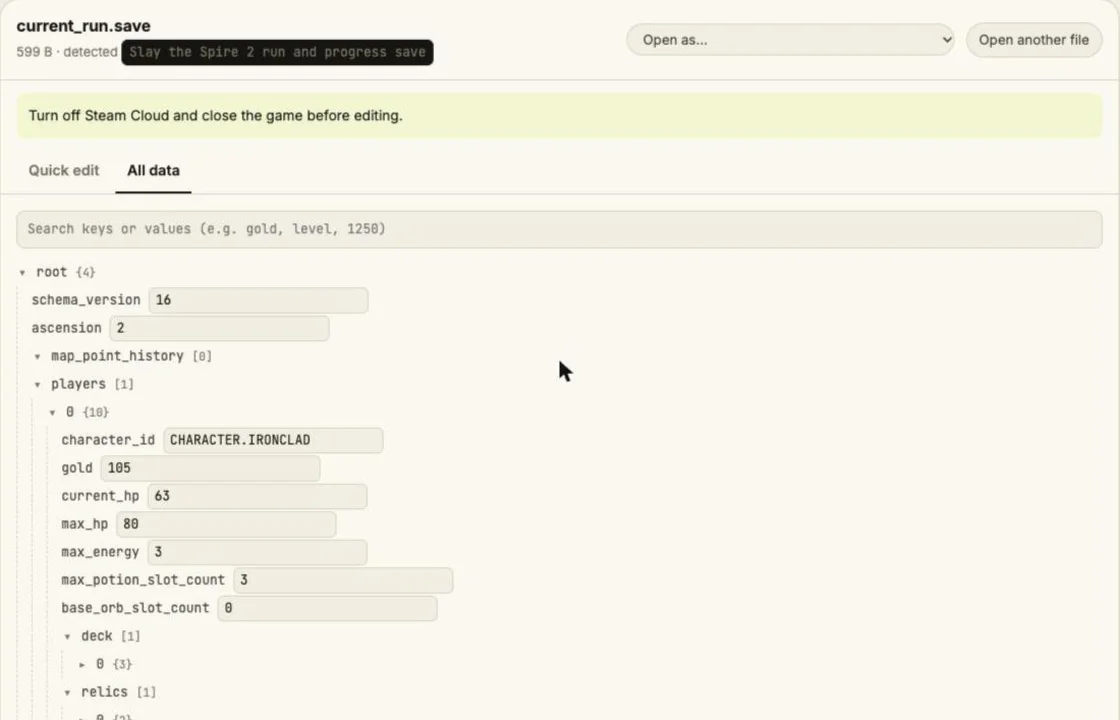
- Deck, relic and potion counts shown read-only; every other key is editable in All data
Where is the Slay the Spire 2 save file?
| Platform | Location |
|---|---|
| Windows (Steam) | %APPDATA%\SlayTheSpire2\steam\<SteamID>\<profile>\current_run.save is the run in progress; progress.save holds unlocks and ascension per character. |
| Steam Deck / Linux (Proton) | ~/.local/share/Steam/steamapps/compatdata/2868840/pfx/drive_c/users/steamuser/AppData/Roaming/SlayTheSpire2/steam/<SteamID>/ |
| Steam Cloud | Steam → Slay the Spire 2 → Properties → General → Keep game saves in the Steam CloudTurn this off while editing or Steam puts the old file back on the next launch. |
Tip: on Windows, paste a path that starts with % into the File Explorer address bar.
How to edit your Slay the Spire 2 save
- Quit Slay the Spire 2 and turn off Steam Cloud for the game.
- Open %APPDATA%\SlayTheSpire2\steam\<SteamID>\ and copy the whole folder somewhere safe.
- Drop current_run.save (mid-run) or progress.save (unlocks) into the editor above.
- Set gold, HP, max energy or ascension in Quick edit. All data shows every other key.
- Click Download edited save and replace the original file with the same name.
- Launch the game and continue the run. Turn Steam Cloud back on once you're happy.
Tips
- Cheats without editing: the game ships a developer console (open it with the ` key after enabling it in settings, where your build allows). Commands such as gold, heal and relic work mid-run but may disable achievements for that run.
- Edit at a map node, not mid-combat. A save made during a fight restores that fight, so a new max HP shows up after it ends.
- Co-op runs store every player in one file. Only the host's file is used when the run resumes.
Limits
- Adding specific cards or relics is not in Quick edit. Their IDs change between Early Access patches, and a wrong ID crashes the run on load. You can still edit the lists in All data at your own risk.
- Only the PC JSON saves are supported. The game is in Early Access, so a patch can rename keys; if the editor says a field is missing, it was moved, not lost.
Editors that work the same way
- Balatro Save Editor: another deckbuilding roguelike, where you set money and unlock decks and stakes the same way.
- Mewgenics Save Editor: a run-based tactics roguelike whose progress file edits just like progress.save.
- Deep Rock Galactic Save Editor: credits and resources for a co-op game that also stores everything in one player save.
- Hollow Knight Save Editor: geo, masks and charms for another hard indie game players love to grind.
- Cult of the Lamb Save Editor: a roguelike with a base-building loop, edited with the same JSON tree view.
- Midgard Survivors Save Editor: a run-based survivors-like where Zeny, cards and refines carry between runs in one profile.
Slay the Spire 2 save editing FAQ
Where is the Slay the Spire 2 save file?
On Windows: %APPDATA%\SlayTheSpire2\steam\<SteamID>\<profile>\. current_run.save is the run in progress and progress.save holds unlocks and ascension.
Are there cheats in Slay the Spire 2?
There are no built-in cheat codes, but the developer console accepts commands like gold and heal where it's enabled. For a permanent change that survives the run, edit the save here.
Why did my gold go back after editing?
Steam Cloud restored the older copy. Turn off Steam Cloud for the game, replace the file again, then launch.
Can I unlock higher ascension for every character?
Yes. Open progress.save and raise Unlocked ascension for each character. The ascension picker shows the new levels on the next launch.
Does it work in co-op?
Yes. Each player in the run has its own gold and HP fields. Edit the host's save; joiners load the host's run.
Is my save uploaded?
No. The editor parses and rewrites the JSON in your browser. Nothing leaves your computer.
Tested on synthetic run and progress saves built to the field layout used by the open-source Edit-The-Spire and sts2-save-editor projects: gold, HP, energy and ascension edits reopen with the new values, an unedited export is byte-identical, and key order and indentation are preserved. Save Editor is an independent tool and isn't affiliated with the makers of Slay the Spire 2.
Other save editors