Save Editor / Games / PokeClicker
PokeClicker Save Editor (Poke Clicker Cheat Save)
Edit your PokeClicker save in the browser: Pokédollars, Quest Points, Dungeon Tokens, Diamonds, Poké Balls, items, gems, berries, shiny Pokémon and new Pokémon by Pokédex number.
Modding instead of editing? How to install mods with r2modman or Gale
Project sources: PokeClicker source (save format)
⚠ Only edit saves of games you play offline or single-player. Editing saves of online games with anti-cheat or a shared economy can get your account banned.
How to verify it never uploads: open DevTools → Network, load your save and download the edited copy — no request carries your file (the only outgoing call is an anonymous page-view count). You can also load the page, turn off Wi-Fi and edit offline.
What you can edit in PokeClicker
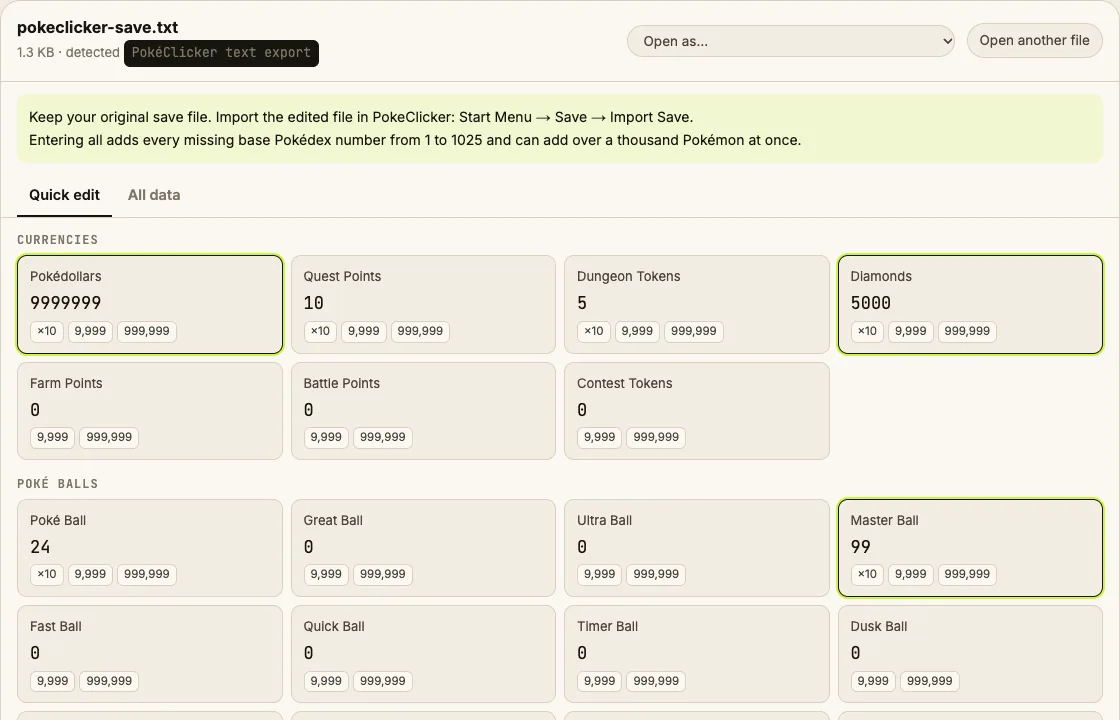
- All seven currencies: Pokédollars, Quest Points, Dungeon Tokens, Diamonds, Farm Points, Battle Points, Contest Tokens
- All 15 Poké Ball counts, Master Balls included
- Items such as Rare Candy, Protein, evolution stones, Linking Cord, eggs and battle items, even ones you don't own yet
- Gems for all 18 types and all 70 berries (new berries are unlocked in the farm too)
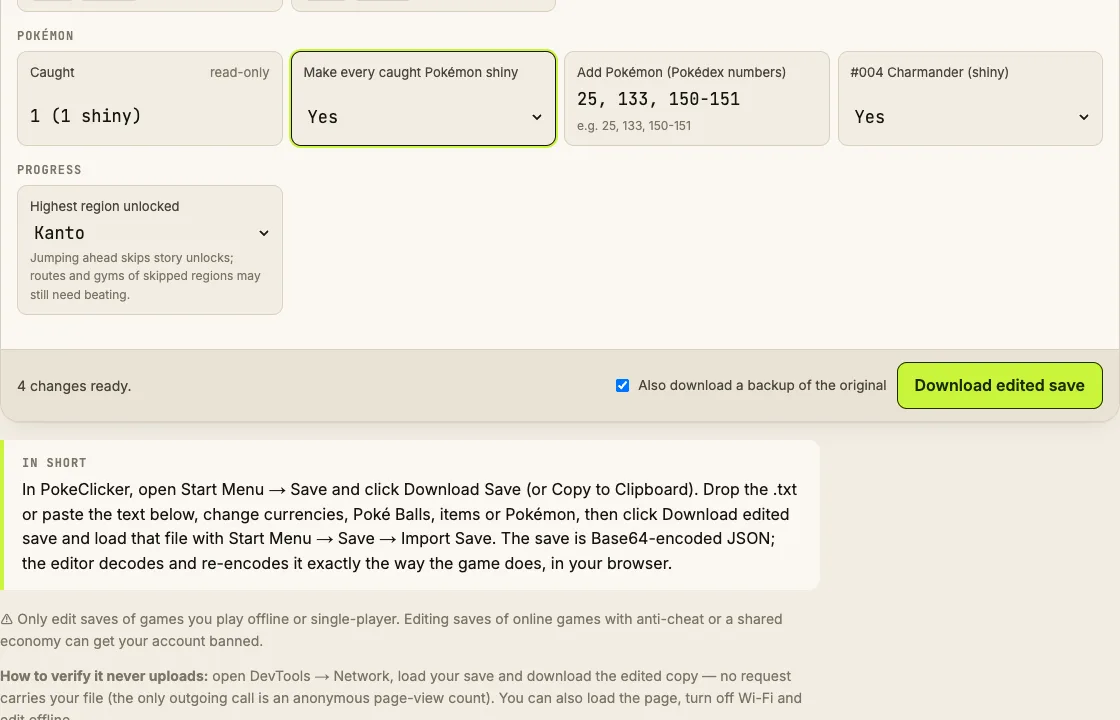
- Add Pokémon by Pokédex number, ranges like 144-146, or all 1,025 at once
- Shiny on/off per Pokémon, or every caught Pokémon shiny in one click
- Highest region unlocked (Kanto to Galar)
- Every other value in All data, from statistics to settings
Where is the PokeClicker save file?
| Platform | Location |
|---|---|
| Browser (pokeclicker.com, any OS) | Start Menu → Save → Download Save (a .txt in your Downloads folder) or Copy to ClipboardThe live save sits in the browser's localStorage; the .txt is the export you edit. |
| PokeClicker desktop app (Windows / Mac / Linux) | Start Menu → Save → Download SaveSame menu and the same file format as the browser game. |
| Phone or tablet browser | Start Menu → Save → Copy to ClipboardPaste the text here, edit, download the result, then pick it with Import Save. |
How to edit your PokeClicker save
- In PokeClicker, open Start Menu → Save and click Download Save. Keep this file untouched as your backup.
- Drop the .txt above, or click Copy to Clipboard in the game and use "Paste a save code".
- Change currencies, Poké Balls, items, gems or berries in Quick edit. Type Pokédex numbers to add Pokémon, or tick shinies.
- Click Download edited save. You get a new .txt (and a backup copy of the original if the box is ticked).
- In the game, open Start Menu → Save → Import Save and choose the edited file. The game reloads with your new values.
Tips
- Download a save before every edit. If the import looks wrong, import that backup and you're back where you started.
- Editing gold-heavy values ruins the climb that makes an idle game fun. Many players add a few Master Balls or a missing Pokémon and leave the rest.
- Close other PokeClicker tabs before importing, or the old tab can save over your edit a few seconds later.
- Adding Pokémon puts them in your party at level 1 with no attack bonus; breed them in the Day Care to grow them like any other catch.
Limits
- Raising the highest region skips story unlocks. Routes, gyms and dungeons of skipped regions can still need beating, and some quests may not trigger. Change it one region at a time.
- Underground layers, quests, farm plots and achievements are shown in All data but have no Quick edit form; edit them there only if you know the game's structure.
- Regional forms (decimal ids such as 25.01) are kept but can't be added by number; add the base Pokémon instead.
- Built for the current 0.10.x saves. Very old exports from before 0.10 aren't tested.
Editors that work the same way
- Cookie Clicker Save Editor: the other browser idle classic, edited from the same kind of exported save text.
- Clicker Heroes Save Editor: gold, rubies and hero souls for the clicker that started the genre.
- Pokémon Save Editor (Gen 3): money, items and badges for the Game Boy Advance Pokémon games (Ruby, Sapphire, Emerald).
- Pokémon Elite Redux Save Editor & Cheats: a FireRed-based hack with its own cheats list and save layout.
- SugarCube Save Editor (Twine .save): another browser game whose save is a text string you export and import.
PokeClicker save editing FAQ
How do I export my PokeClicker save?
Open Start Menu → Save. Download Save writes a .txt file; Copy to Clipboard copies the same text. Both work here.
How do I load the edited save back into Poke Clicker?
Start Menu → Save → Import Save, then choose the edited .txt. The game checks it, replaces your current save and reloads. On the title screen, Import Save does the same.
What format is a PokeClicker save?
Base64 of a JSON object with three parts: player, save and settings. Characters outside Latin-1 (like Japanese nicknames) are URL-encoded first. The editor uses the same rules, so the game reads the result like its own export.
Is there a PokeClicker cheat save I can just download?
You don't need someone else's save. Export yours, give it the Pokédollars, Poké Balls or Pokémon you want here, and import it. Your trainer, settings and progress stay yours, and you control how much you change.
Can I add any Pokémon, including legendaries?
Yes. Type Pokédex numbers (150, 151), ranges (144-146) or all. They appear in your party with normal stats; shiny is separate.
How do I make a Pokémon shiny?
Set its "(shiny)" field to Yes in the Pokémon group, or set "Make every caught Pokémon shiny" to Yes. The game stores shiny as one flag per Pokémon.
Is this the same as a Poke Clicker save editor?
Yes. Poke Clicker, PokeClicker and PokéClicker are the same browser game, and this Poke Clicker save editor reads the save from pokeclicker.com and the desktop client alike.
Can I add items I don't own yet, like Rare Candy?
Yes. Every item in the list shows 0 when you have none; type an amount and it's added to your bag. Setting it back to 0 removes it, the same way the game does.
Will PokeClicker detect or ban an edited save?
PokeClicker is a single-player game with no server-side check on your save. Achievements and statistics simply count what's in the file.
Does this pokeclicker save edit work on mobile?
Yes. Copy the save to the clipboard on your phone, paste it here, download the edited file and pick it with Import Save.
Is my save uploaded?
No. Decoding, editing and encoding run in your browser. You can check the Network tab: nothing is sent.
Format checked against PokeClicker's source (SaveSelector btoa/atob) and a real v0.10.26 export: an unedited save comes back byte-identical, and an edited save imported in the live game shows the new values. Save Editor is an independent tool and isn't affiliated with the makers of PokeClicker.
Other save editors