Save Editor / Games / Schedule I
Schedule I Save Editor
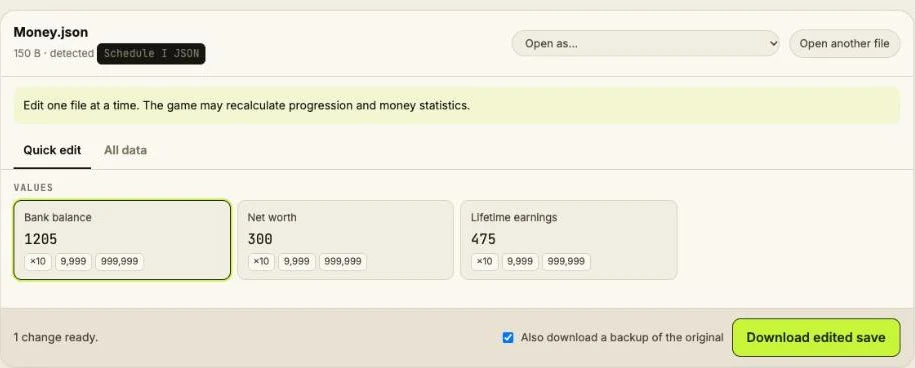
Edit Schedule I bank balance, net worth, rank and XP from individual save files.

Project sources: Schedule I file layoutSchedule I rank example
⚠ Only edit saves of games you play offline or single-player. Editing saves of online games with anti-cheat or a shared economy can get your account banned.
How to verify it never uploads: open DevTools → Network, load your save and download the edited copy — no request carries your file (the only outgoing call is an anonymous page-view count). You can also load the page, turn off Wi-Fi and edit offline.
What you can edit in Schedule I
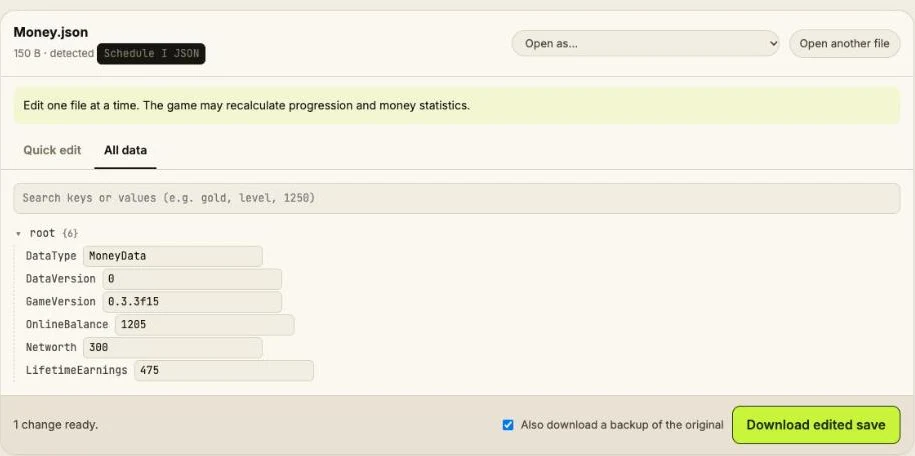
- Online balance, net worth and lifetime earnings
- Rank, tier, XP and total XP
- Existing inventory values in All data
Where is the Schedule I save file?
| Platform | Location |
|---|---|
| Windows | %USERPROFILE%\AppData\LocalLow\TVGS\Schedule I\Saves\<SteamID>\SaveGame_NFind the money or rank file in the slot folder. |
| Steam Deck (Proton) | ~/.local/share/Steam/steamapps/compatdata/3164500/pfx/drive_c/users/steamuser/AppData/LocalLow/TVGS/Schedule I/Saves/<SteamID>/SaveGame_NUse the prefix in the Steam library where the game is installed. |
Tip: on Windows, paste a path that starts with % into the File Explorer address bar.
How to edit your Schedule I save
- Quit the game and pause cloud sync.
- Copy the entire save folder to a backup outside the game directory.
- Open the indicated file and confirm the values match your progress.
- Make one change and download the edited file. Replace the original using the same filename.
- Launch offline and check the result. Restore the complete backup with the game closed if needed.
Limits
- One JSON file per session. Whole slot folders and archives stay in your file manager.
- The game can recalculate net worth or progression when it loads.
Schedule I save editing FAQ
Which file holds my bank balance?
Money.json stores OnlineBalance. Cash in a player inventory is separate.
Where is my inventory?
Look for Inventory.json in the matching Players/Player_<ID> folder when your version stores inventory separately.
Can I change rank and XP together?
Both appear in Rank.json when present. Keep rank, tier and XP consistent before saving.
How do I restore a backup?
Close the game and copy the backed-up save folder to its original location.
Why did my changes disappear?
Cloud sync can restore an older copy. Pause sync and verify the edited save offline before resuming.
Checked against public format references and synthetic fixtures. Game-load verification is pending. Save Editor is an independent tool and isn't affiliated with the makers of Schedule I.
Other save editors