Save Editor / Games / Mewgenics
Mewgenics Save Editor
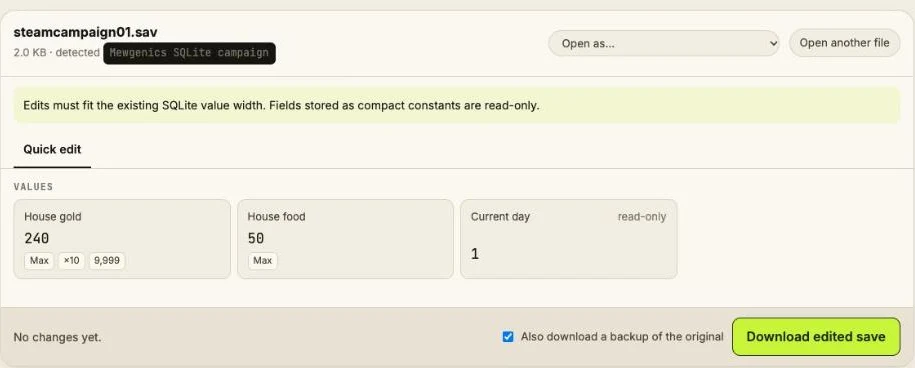
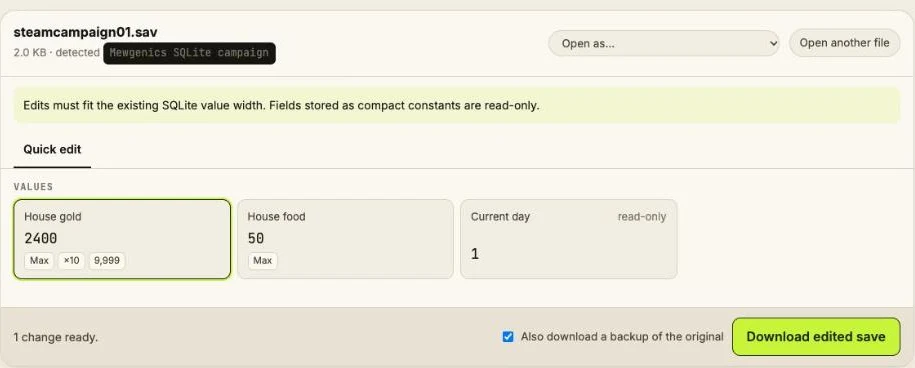
Edit supported Mewgenics campaign values like house gold and food in your browser.
Modding instead of editing? How to install mods with r2modman or Gale
Project sources: Mewgenics property parserSteam cloud save location
⚠ Only edit saves of games you play offline or single-player. Editing saves of online games with anti-cheat or a shared economy can get your account banned.
How to verify it never uploads: open DevTools → Network, load your save and download the edited copy — no request carries your file (the only outgoing call is an anonymous page-view count). You can also load the page, turn off Wi-Fi and edit offline.
What you can edit in Mewgenics
- House gold and food when present
- Current day when present
- Read-only display for compact SQLite constants
Where is the Mewgenics save file?
| Platform | Location |
|---|---|
| Windows (Steam) | %APPDATA%\Glaiel Games\Mewgenics\<SteamID>\saves\Choose the steamcampaign file for your slot. |
| Steam Deck (Proton) | ~/.local/share/Steam/steamapps/compatdata/686060/pfx/drive_c/users/steamuser/AppData/Roaming/Glaiel Games/Mewgenics/<SteamID>/saves/Use the Steam library for this installation. |
Tip: on Windows, paste a path that starts with % into the File Explorer address bar.
How to edit your Mewgenics save
- Quit the game and pause cloud sync.
- Copy the entire save folder to a backup outside the game directory.
- Open the indicated file and confirm the values match your progress.
- Make one change and download the edited file. Replace the original using the same filename.
- Launch offline and check the result. Restore the complete backup with the game closed if needed.
Limits
- Supports the rowid properties layout in closed-game SQLite campaign files.
- Values can only grow within their existing storage width. Cat records and adventure blobs stay opaque.
Editors that work the same way
- Slay the Spire 2 Save Editor & Cheats: gold, HP and unlocked ascension for another run-based roguelike.
- Balatro Save Editor: money, decks and stakes for a roguelike deckbuilder.
- Cult of the Lamb Save Editor: resources and followers for a roguelike with a base to manage.
- Deep Rock Galactic Save Editor: credits and resources for a co-op game you play in runs.
Mewgenics save editing FAQ
Which file is my first campaign?
steamcampaign01.sav is campaign slot one. Back up the entire saves folder before replacing it.
Why is a value read-only?
SQLite stores some values, such as zero or one, without payload bytes. Those values need a database rewrite to change.
Can I edit individual cats?
This editor covers selected campaign properties. It leaves cat records and item containers alone.
How do I restore a backup?
Close the game and copy the backed-up save folder to its original location.
Why did my changes disappear?
Cloud sync can restore an older copy. Pause sync and verify the edited save offline before resuming.
Checked against public format references and synthetic fixtures. Game-load verification is pending. Save Editor is an independent tool and isn't affiliated with the makers of Mewgenics.
Other save editors