Save Editor / Games / Cult of the Lamb
Cult of the Lamb Save Editor
Edit gold and inventory in legacy Cult of the Lamb JSON slots.

Modding instead of editing? How to install mods with r2modman or Gale
Project sources: CotL JSON decryptor sourceLegacy JSON field referenceMessagePack format notes
⚠ Only edit saves of games you play offline or single-player. Editing saves of online games with anti-cheat or a shared economy can get your account banned.
How to verify it never uploads: open DevTools → Network, load your save and download the edited copy — no request carries your file (the only outgoing call is an anonymous page-view count). You can also load the page, turn off Wi-Fi and edit offline.
What you can edit in Cult of the Lamb
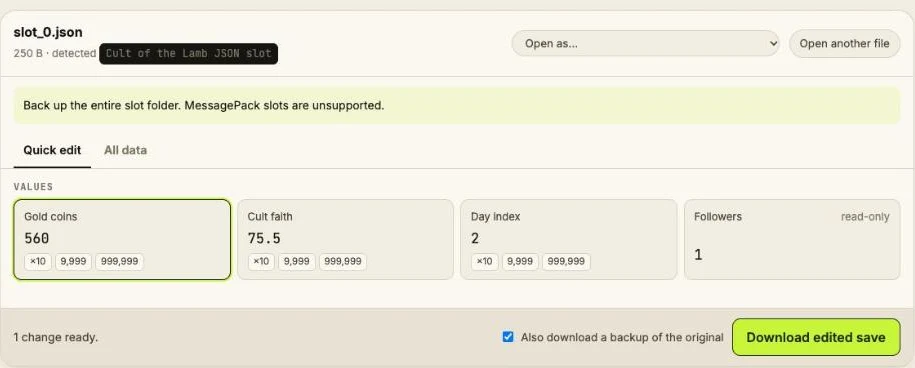
- Gold coins, logs and stone when present
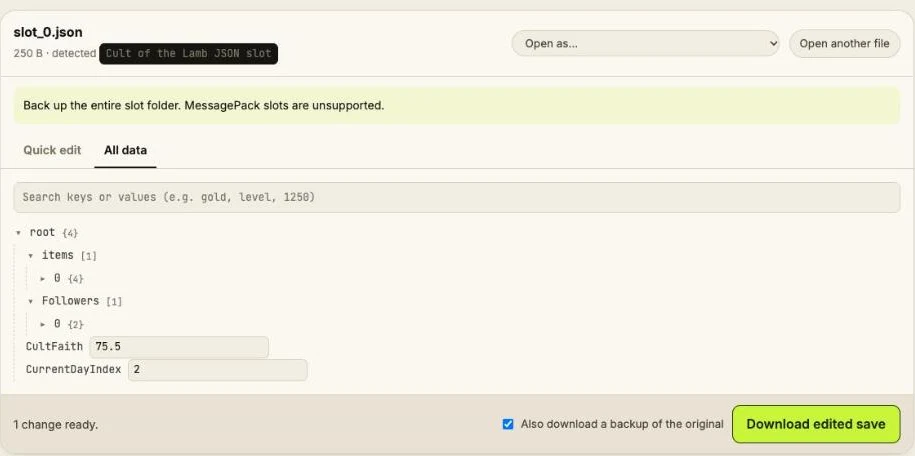
- Cult faith and day index
- Follower count (read-only)
- Existing values in All data
Where is the Cult of the Lamb save file?
| Platform | Location |
|---|---|
| Windows | %USERPROFILE%\AppData\LocalLow\Massive Monster\Cult Of The Lamb\saves\Slot numbering starts at zero. |
| macOS | ~/Library/Application Support/Massive Monster/Cult Of The Lamb/saves/This path is for the desktop Unity release. |
| Steam Deck (Proton) | ~/.local/share/Steam/steamapps/compatdata/1313140/pfx/drive_c/users/steamuser/AppData/LocalLow/Massive Monster/Cult Of The Lamb/saves/Look in the prefix for your Steam library. |
Tip: on Windows, paste a path that starts with % into the File Explorer address bar.
How to edit your Cult of the Lamb save
- Quit the game and pause cloud sync.
- Copy the entire save folder to a backup outside the game directory.
- Open the indicated file and confirm the values match your progress.
- Make one change and download the edited file. Replace the original using the same filename.
- Launch offline and check the result. Restore the complete backup with the game closed if needed.
Limits
- Supports legacy JSON payloads. Current MessagePack and Apple Arcade containers require another tool.
- Quick edit only shows resources already present in the inventory.
Cult of the Lamb save editing FAQ
Which filename should I open?
Choose the slot_N.json file for your cult. Keep the matching meta file in your backup.
Does the editor keep the AES header?
Yes. Edited encrypted slots reuse the original header, key and initialization vector.
Can I open a slot ending in MP?
This editor reads JSON payloads. See the linked reference for the newer MessagePack format.
How do I restore a backup?
Close the game and copy the backed-up save folder to its original location.
Why did my changes disappear?
Cloud sync can restore an older copy. Pause sync and verify the edited save offline before resuming.
Opened and round-tripped a public legacy JSON slot. AES interoperability was checked with a synthetic slot. Save Editor is an independent tool and isn't affiliated with the makers of Cult of the Lamb.
Other save editors